

Trademark: The following marks are the intellectual property of e-On Batteries, Inc.:

Errors and Omissions
Every effort has been made to ensure that the technical content in this document is complete, correct, and current. e-On Batteries, Inc. assumes no responsibility for results of errors beyond its control and, makes no warranty of any kind, expressed, or implied, as to the accuracy or completeness of the information contained in this manual. e-On may make changes without prior notice to customers. Please contact your distributor to obtain the latest version of the manual.
About This Document
This document describes the application scenarios, installation, electrical connection,
commission and troubleshooting of e-On's 532 kWh PowerBlock Smart Battery Energy
Storage System. Before installing and operating the system. Please ensure that you
are familiar with PowerBlock features, functions, and all safety precautions as
provided in this document. This manual is applicable to the following PowerBlock
Models:
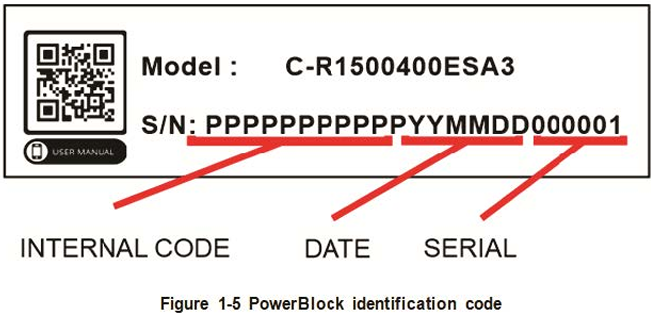
Model # : EBC-R1500400ESA3
Who should read this manual?
Technicians
Installers
Commissioning Personnel
Maintenance Staff
Operators
'
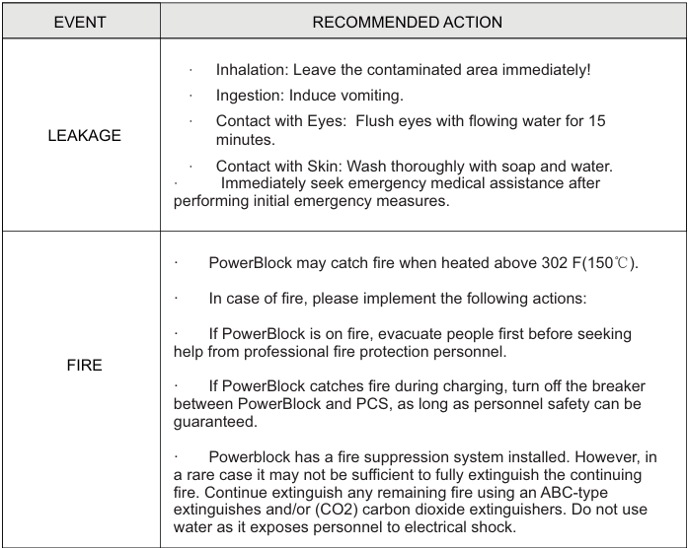
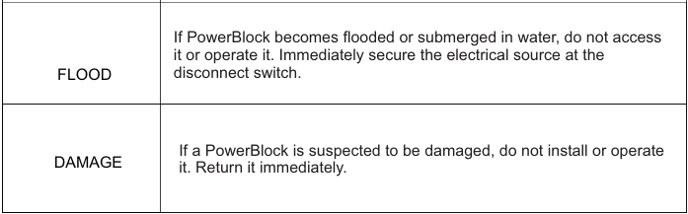
Table 1-1 Responses to Emergencies
- After opening the PowerBlock door, install the cabinet door support rod (lower
part of door) to hold the door in place. This is extremely important where wind gusts
may occur. - Special protective equipment must be used during installation, operation and
maintenance, such as insulating gloves, eye protection, fire-retardant safety clothes,
helmets, face shields, safety shoes, etc. - Installation, operation and maintenance must be carried out in the specific
sequence of steps laid out in this manual. - Before contacting any conductor surface or terminal, measure the voltage at the
contact point to confirm that there is no risk of electric shock. - After installing the equipment, the empty packaging materials such as cartons,
foam, plastic, tie line, etc. should be removed. - In case of fire, evacuate the equipment area and dial the fire alarm telephone. In
this case, it is strictly forbidden to remain in close proximity to the PowerBlock.
Immediately remove all personnel to a safe distance, and notify for emergency
personnel. - Heed the warnings and preventive measures in the manual and posted on the
equipment. Replace the hazard signs that become unclear due to long-term use, sun
fade, etc. - Apart from the personnel operating the equipment, other personnel should not
approach the equipment. - Use sealant to seal cable holes that have been routed, and use the cover
delivered with the cabinet to seal cable holes that have not been routed. - It is strictly forbidden to alter, damage or cover the warning placards on the
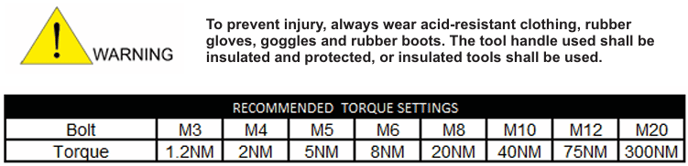
equipment. - When installing the equipment, use a torque wrench with an appropriate range to
tighten the screws. Ensure that a wrench is used to tighten the screws. The wrench is
not skewed, and the torque error does not exceed 10%. See torque specifications list. - Do not operate the system during installation and maintenance or inspection.
Exterior finish or scratch damage (from damage in transit) and installation of equipment must be responsibly maintained and repaired. Resulting damage from long term exposure to harsh or outdoor environments are not covered under our warranty. - Permission to operate equipment should not be granted until installation is
complete and the unit is firmly affixed to the floor or pad mount.
1. Important Safety Information
1.1 Safety requirements
When installing, operating and maintaining the equipment, please read this manual first and
follow the safety placards on the equipment and all safety precautions in the manual.
The terms "instructions", "caution", "warning" and "danger" in the manual do not represent all
safety precautions to be observed, but only supplement all safety precautions. e-On shall not be
liable for any violation of general safety operation requirements or safety standards for design,
PowerBlock equipment and use of said equipment.
The equipment shall be used in an environment that meets the requirements of design
specifications; otherwise it may cause equipment failures. Abnormal standby function,
component damage, personal safety accident, property loss, etc. are not within the scope of
equipment quality assurance.
The installation, operation and maintenance of the equipment shall comply with local laws,
regulations and specifications. The safety precautions in the manual are only a supplement to
local laws, regulations electrical code and specifications of governing bodies.
e-On Batteries Inc. shall not be liable for any of the following circumstances:
Equipment not operating under the service conditions described in this manual.
Installation methods, construction details and operating environment.
Disassembly or changing the PowerBlock hardware, design and/or modifying the software code
without authorization.
Failure to follow the operating instructions and safety warnings on the equipment or documents.
Equipment damage caused by abnormal natural environment (force majeure, such as
earthquake, fire, storm, acid rain, snow disaster, etc.
Transportation damage caused by customer's own transportation.
Damage caused by storage conditions not meeting the requirements stated in PowerBlock
documents.
Using a PCS that is incompatible with the PowerBlock.
General Safety Guidelines
It is generally unsafe to install, operate or perform maintenance on outdoor equipment and
cables (including, but not limited to, handling equipment, manipulating equipment and cables,
plugging and unplugging interfaces, etc.) in severe weather such as lightning, rain, snow and/or
strong winds exceeding 24 mph (10.8m/s).
To avoid possible electric shock during installation, operation and maintenance, it is
recommended that technicians or installers avoid wearing metallic jewelry and/or any other
easily conductive items such as a metallic writing pen.
- Use only dry cloth to clean or wipe inside or outside of the cabinet.
- It is imperative to follow the installation sequence of the equipment. Failure to do so may
damage the equipment or put personnel at risk. - Do not touch running fan with your fingers, parts, screws, tools, or boards while the fan is
running or energized. - To avoid electric shock, do not connect Safety Extra-Low Voltage (SELV) circuits to the
distribution circuit or HVDC circuit.
Personnel requirements
- Trained personnel are required for installing and maintaining equipment. They must
be trained in understanding the general and specific safety precautions and
operating protocols. - Replacement of equipment or parts (including software) must be done by
professional/authorized personnel.
Electrical safety
- The PGND cable must be installed first. When removing the equipment, the PGND
wire must be removed last. Do not operate the device without grounding conductor.
Equipment should be permanently connected to the grounding apparatus. Before
opera ting the device, check the electrical connection of the device and ensure that
the device is properly grounded. - Be sure to protect the grounding cable.
- When performing high-voltage operations, use HV insulated insulation tools.
Antistatic requirements
- Circuit boards are sensitive to static discharge. Use an ESD wrist strap or ESD
gloves before touching the device or handling boards or integrated circuits. Ensure
the other end of the ESD wrist strap is well-grounded. - When holding a board, grasp an area near the edge of the board that has few
electronic components. Avoid touching electronic components with your
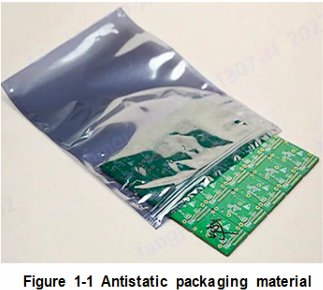
hands. Occasionally, some components remain energized after removal. - The removed boards must be packed with antistatic packaging materials for storage or
transportation.
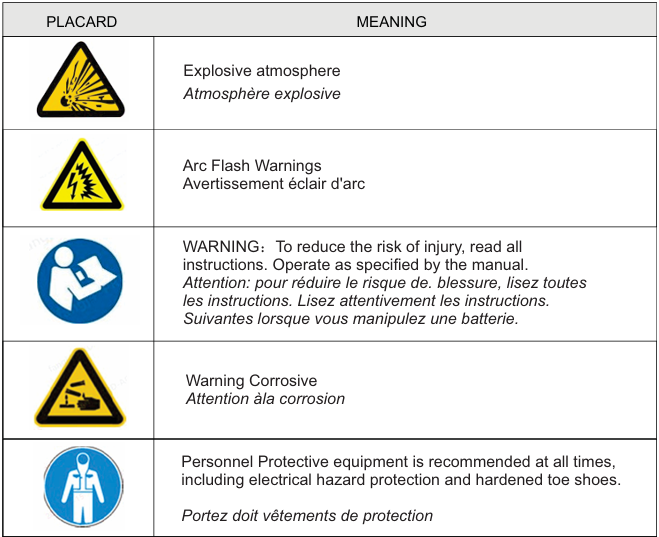
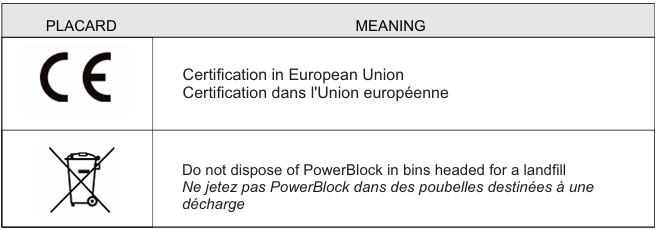
Figure 1.3 Symbols
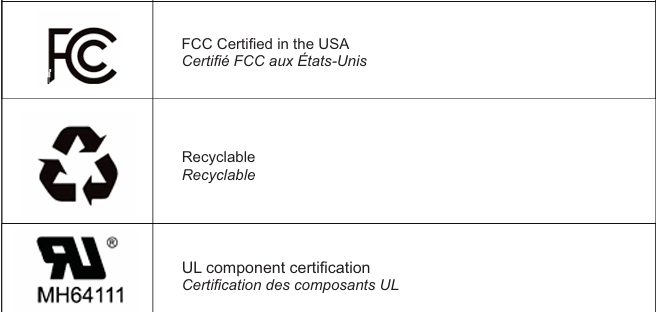
Symbols and Conventions
Visual indicators are used in this manual and on the product itself. These symbols represent physical and operational threats and must be observed and understood by users, installers and maintenance personnel.
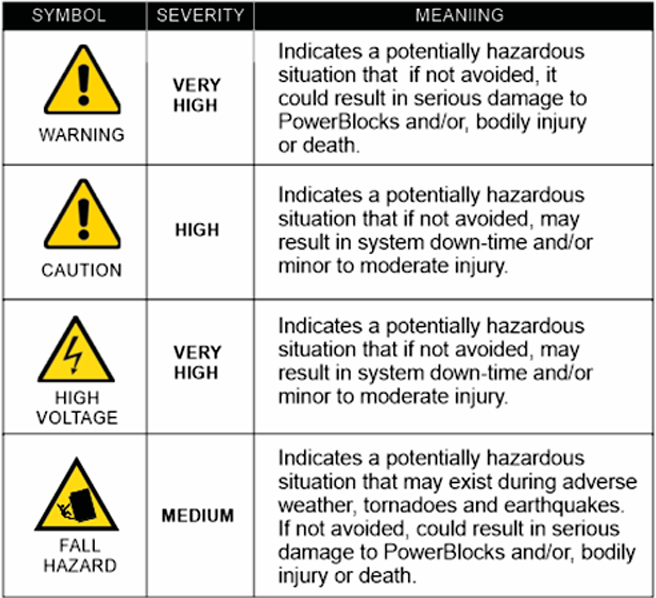
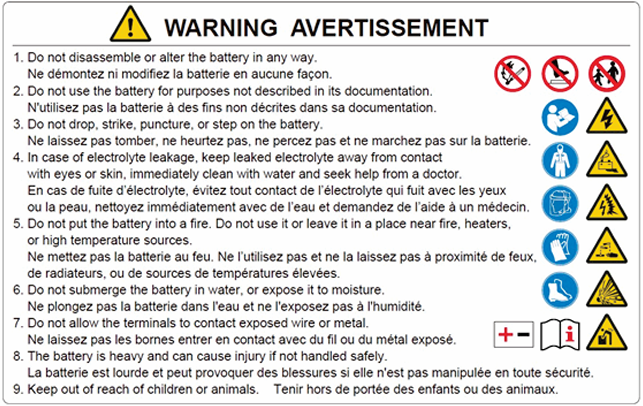
Figure 1.3 Symbols (Cont.)
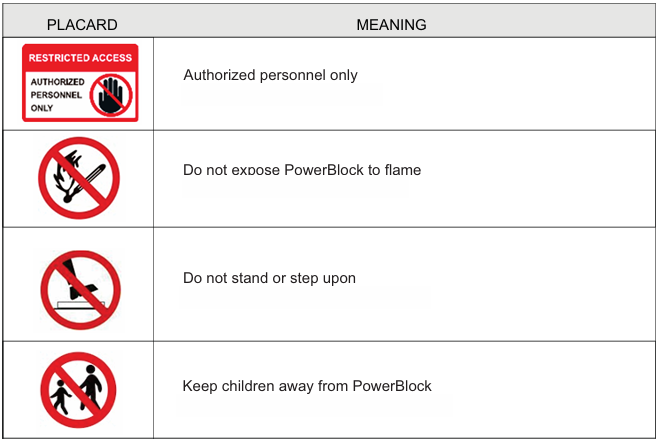
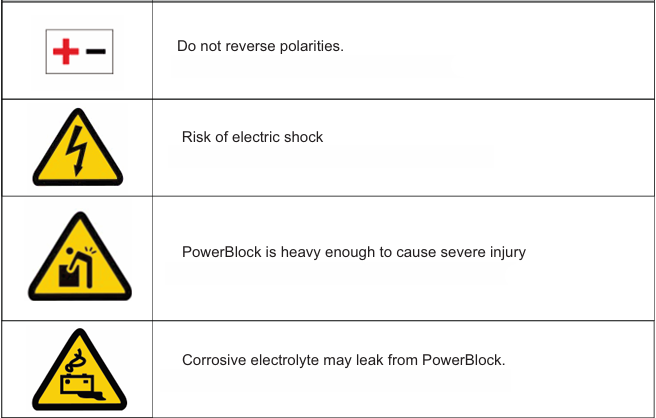
Risks of electrolyte leakage
- Do not subject PowerBlock to strong impact.
- Do not crush or puncture PowerBlock.
- Do not open or destroy the battery modules.
- Released electrolyte is harmful to the skin and eyes. Wear eye protection when
possible. - Avoid a fall by physically mounting the PowerBlock. If a fall does occur, turn off the
PowerBlock immediately and discontinue use.
Risks of fire
- Do not expose PowerBlock to prolonged direct sunlight.
- Avoid contact with conductive objects such as wires.
- Keep PowerBlock away from fire source, flammable, explosive and chemical materials.
- Do not dispose of batteries by recycling them properly. The batteries may explode
during a fire event.
Risks of electric shock
- Do not touch PowerBlock with wet hands.
- Secure access to PowerBlock from children and pets.
- In the rare event of a short circuit, PowerBlock can present a risk of electric shock.by a
high short-circuit current.
2. PowerBlock Introduction
2.1 PowerBlock Features
- Compared with a normal Battery Energy Storage System (BESS), the PowerBlock is characterized with better charging and discharging performance, longer cycle life and less self-discharging loss. A maximum of 4 PowerBlocks can be connected in parallel (with no additional equipment) to expand overall storage capacity. Combiner boxes can be utilized to combine any number of PowerBlocks to attain any desired capacity. The system supports communication with PCS via CAN or Ethernet communication ports.
- Monitoring - Detect the voltage and temperature of cell as well as the voltage and current of the PowerBlock.
- SOC estimate - Indicate the amount of remaining electricity.
- Alarm – Sounds when over-voltage, under-voltage, over-current, over-temperature or under-temperature occurs.
- Protection – Provides protection against over voltage, under voltage, over current, over temperature, under temperature, cell fault and hardware failure.
- Report - Reports alarm messages and operation data to PCS/EMS via CAN or Ethernet network ports.
- Parallel Connection - Supports a maximum of 4 PowerBlocks in parallel. No combiner box needed.
2.2 Application Scenarios
PTL, C&I, ESS - PowerBlock is capable of various on-grid applications, such as tariff
optimization, peak loading shaving, energy shifting, and demand response. In addition, the
PowerBlock can be used on micro-grid to support backup and island systems.
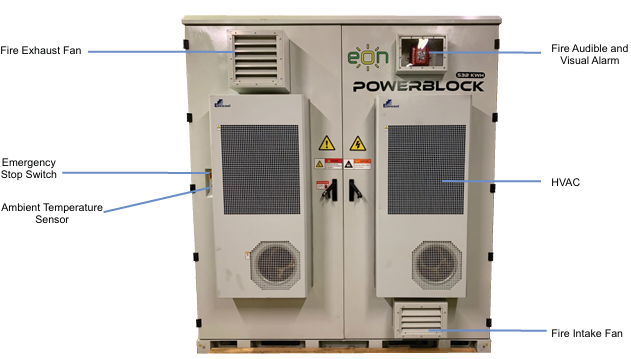

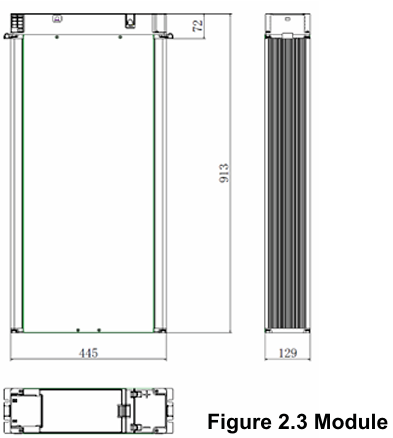
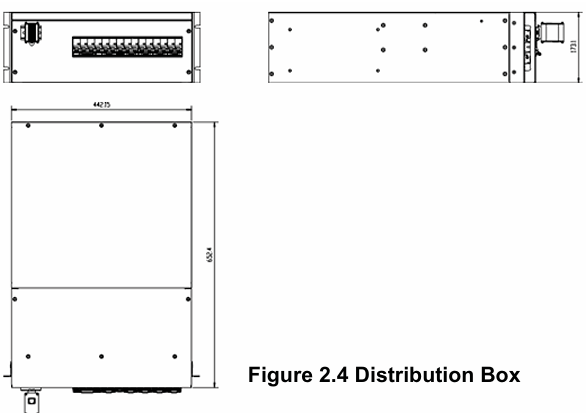
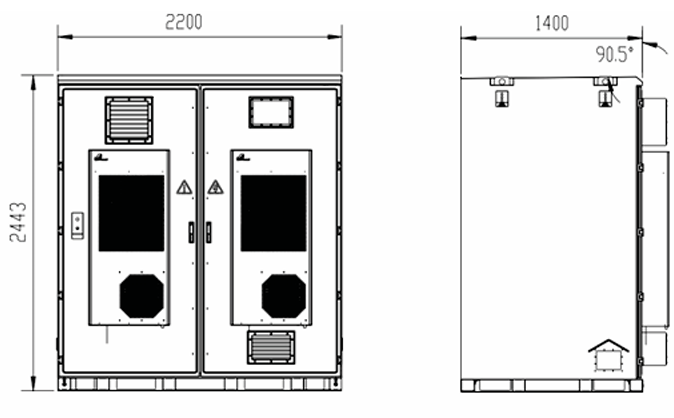
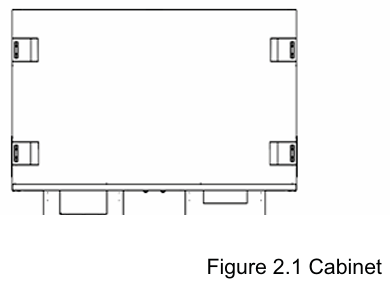
2.3 Appearance and Terminals
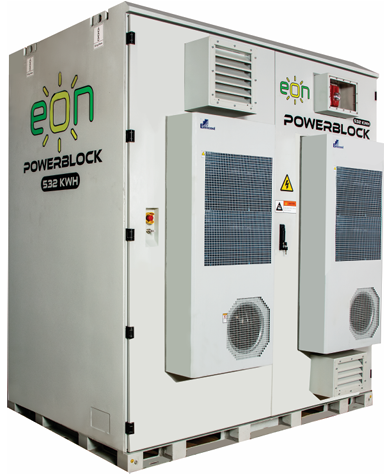
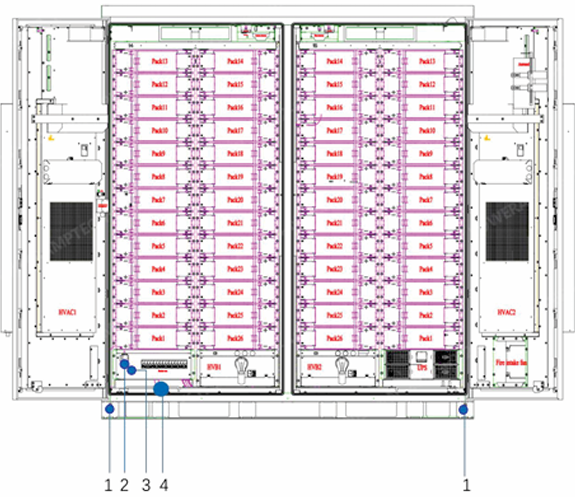
The PowerBlock is composed of 52 battery modules, 2 high-voltage boxes and 1 power
distribution box.
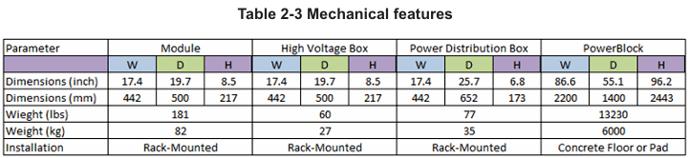
2.3.1 Appearance
PowerBlock dimensions (unit: mm) and illustrations are shown below:
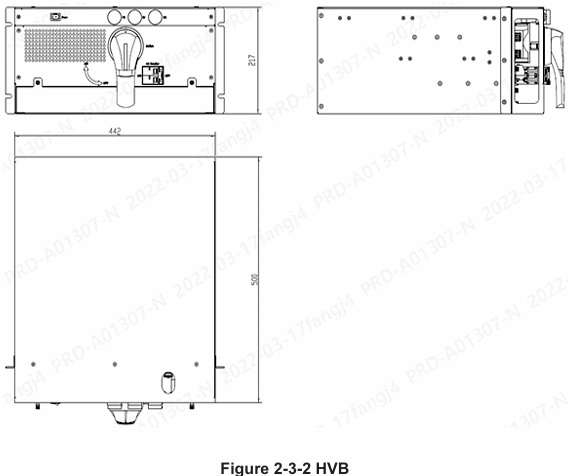
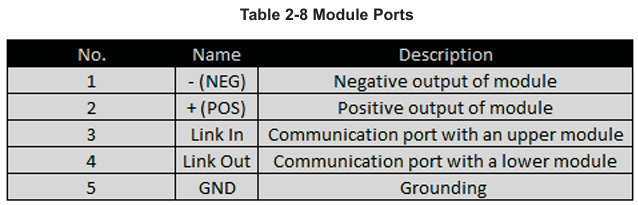
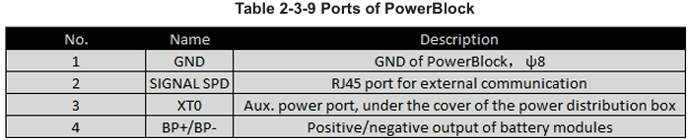
2.3.3 Ports and Terminals
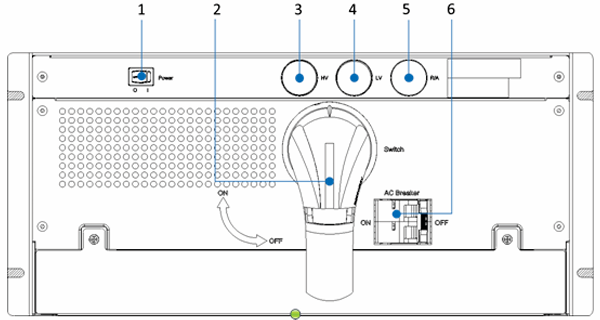
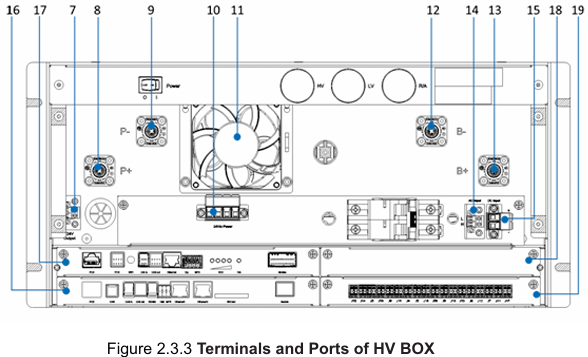
1.1.1 Ports and Terminals
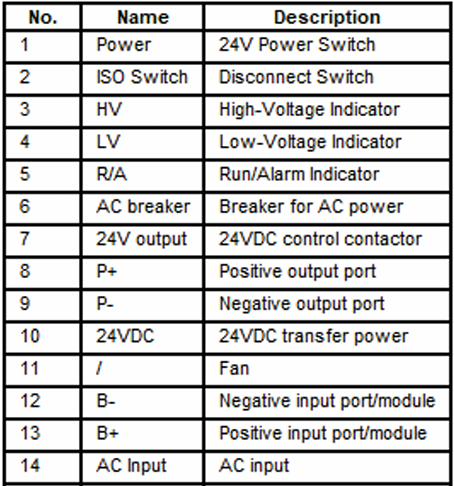
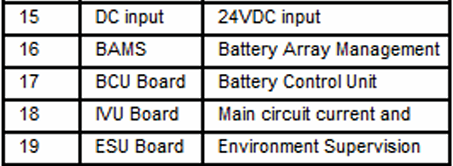
Table 2-2 Ports of HVB
Table 2-4 HVB-BAMS (Optional)
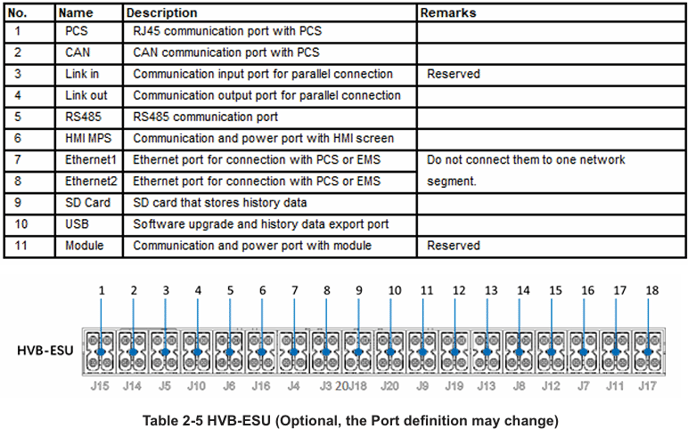
1.1.1 Ports and Terminals
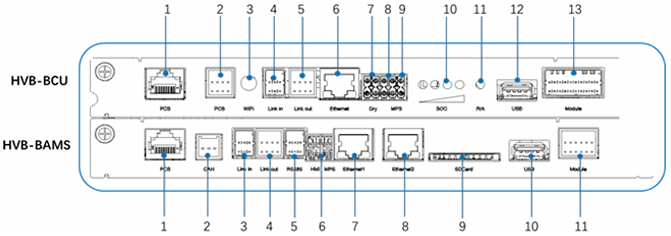
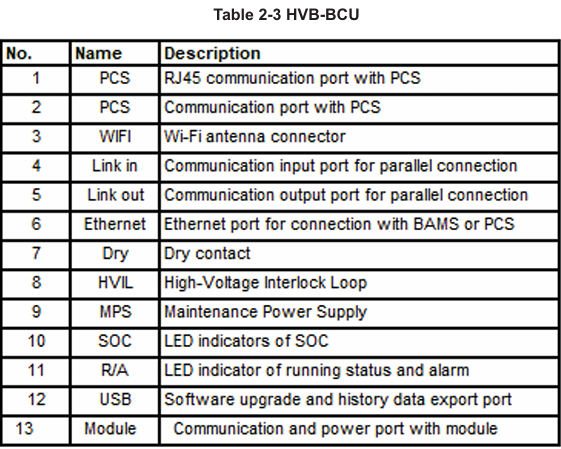
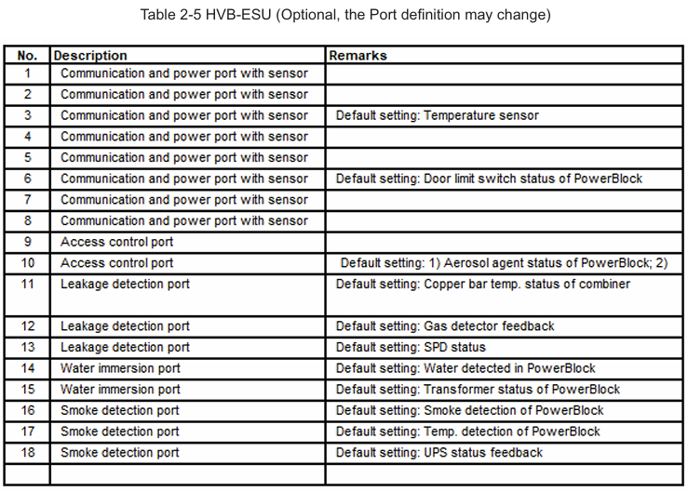
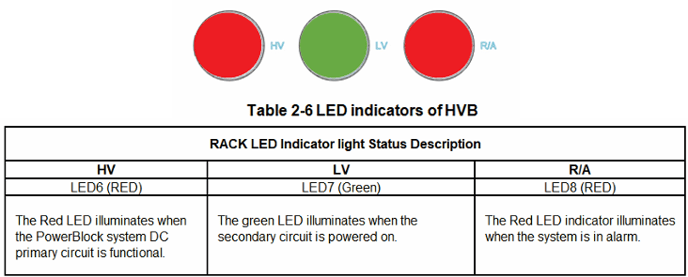
2.4 Technical Parameters
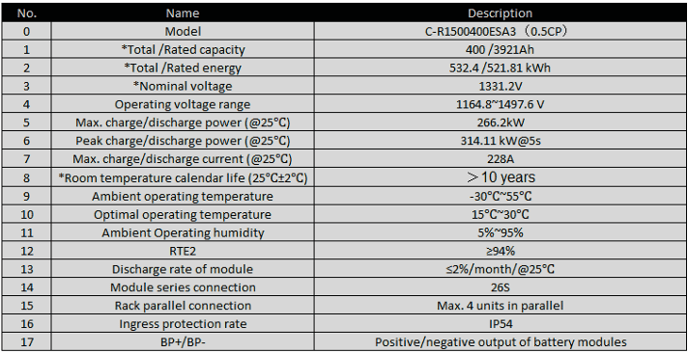
Measurement protocol:
- Resting PowerBlock module at 25 degrees Celcius ambient temperature to stabilize the cell
temperature at 250 degrees Celcius ±2 degrees. - 0.5CP (constant power=266.2kW) charge to 3.55V as cell (max), rest 5min, 0.05CP(constant
power=26.6 kW) charge to 3.55V as cell (Max), rest 30min ;Then 0.5CP (constant power=5.12 kW) discharge to 2.8V, rest 30min, 25 degrees Celcius ±2 degrees. - Repeat step 3 times and take the average value.
- RTE: Round-trip efficiency (RTE) – the ratio of discharge energy removed to regen energy
returned during the profiles.
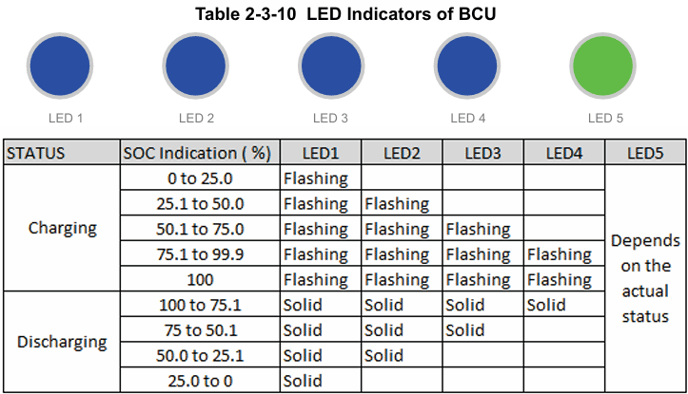
These State of Charge indicators will flash when the PowerBlock is charging. They will remain solid when discharging or on standby.
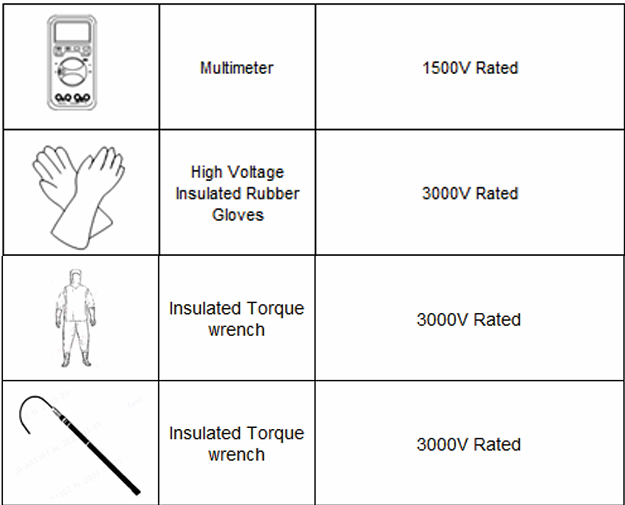
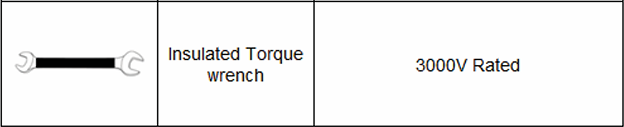
4 Storage and Installation
4.1Storage
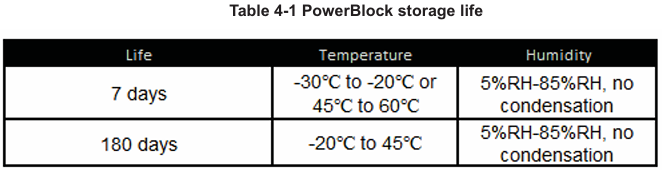
After the PowerBlocks are transported to the site, they needs to be stored according to the
conditions in table 4 -1. During storage, the voltage will drop and the recoverable capacity will
be lost little by little with the time, the SOC should be adjusted to around 30% when
PowerBlocks are stored more than 3 months. If the PowerBlocks are not used for a long time
and the air conditioners stop running, they need to be stored according to the requirements of
storage conditions.
- Place PowerBlocks according to signs on packing.
- Store batteries in a place free from direct sunlight and rain.
- Keep batteries at least 7 Feet (2m) away from a heat source (such as a radiator).
- Avoid contacting with corrosive and organic substances (including gas exposure).
- Keep the storage area dry, clean and well ventilated.
- Recharge a PowerBlock that has been stored for 3+ months.
- Batteries with deficiencies should be separated from normal batteries by placing a suitable barrier between them or placing in different fire protection zones altogether.
4.2 Inspection
Check carefully for any damages on the package (i.e., holes, cracks or other traces). Do not open
the package, and contact your distributor once package damages are found.
Open the package, inspect the PowerBlock for damages, such as cracks, dents, punctures,
deformations, acid leaks or other visible abnormalities, and check if all accessories in the list are
included. Report missing or damaged parts to your distributor.
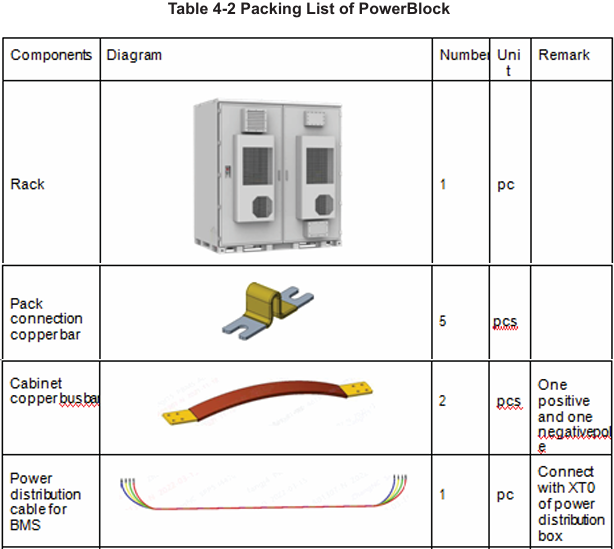
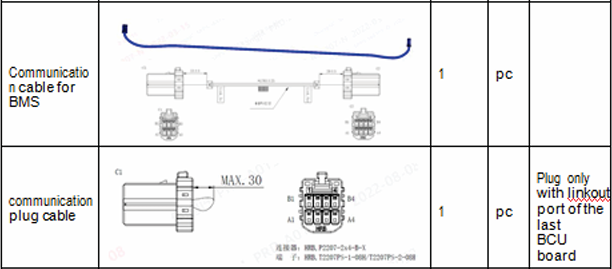
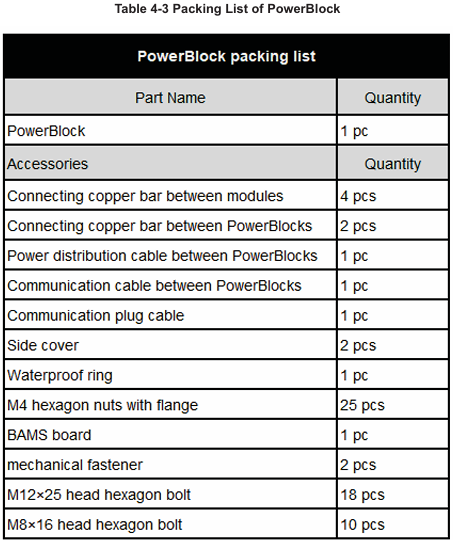
Table 4-2 Packing List of PowerBlock
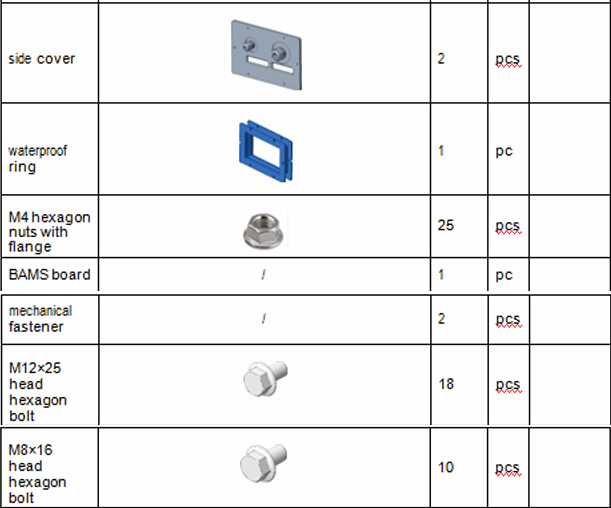
Note: The quantity of cables in the table meets the requirements of 2 groups of 26 modules in
series. The accessories are configured for maximum compatibility, not all of them will be used.
The accessories are subject to change before delivery.
4.3.1 Installation Requirements
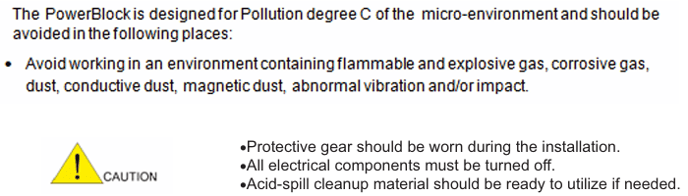
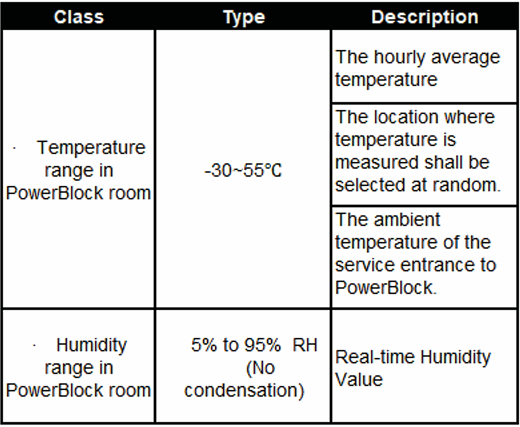
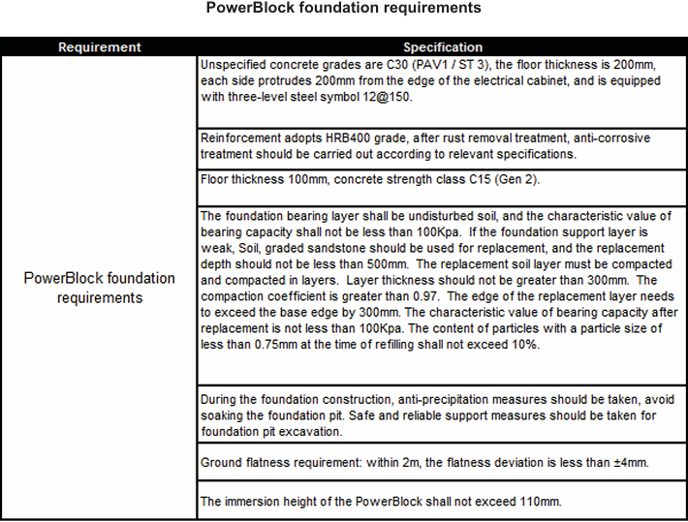
The PowerBlock supports floor standing installation and can be installed indoors or outdoors. Ensure that the installation meets the requirements for environment, distances, and orientation.
For Distance and Orientation
There is no limit on the minimum distance of back-to-back installation of the PowerBlocks when
the water pipe is not installed. When installing water pipes, the minimum distance of back-to-back installation of PowerBlocks shall be determined by the installation space of water pipes.
4.3.2 Unpacking
Unpacking steps are as follows:- Remove the packing belt and winding film on box.- Remove the foam at the front, back, left, right and top of the PowerBlock and BCP.- Unpacking completed.
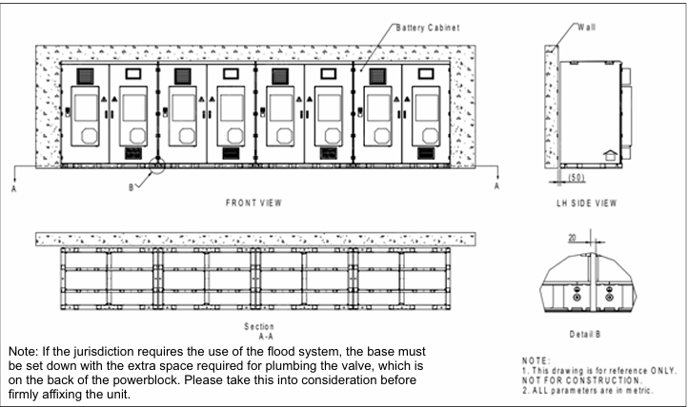
Installation against a wall
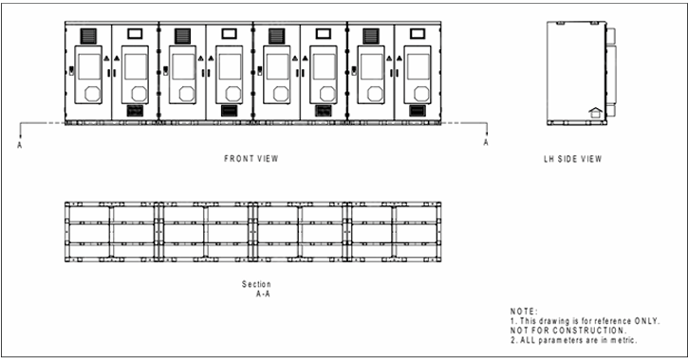
Freestanding installation
4.3 Installation
The PowerBlock supports indoor and outdoor applications and can be used in Class C environments.
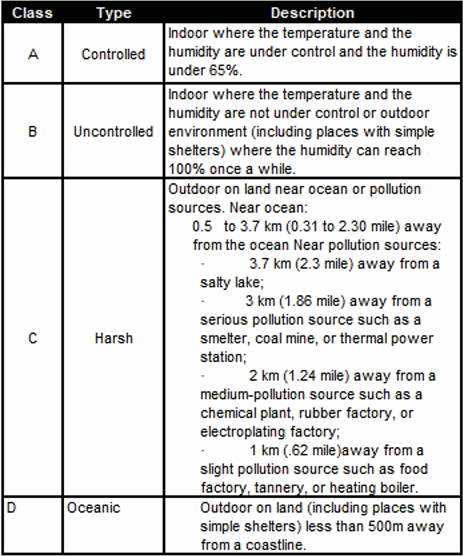
Table 4-4 Application Environment Class
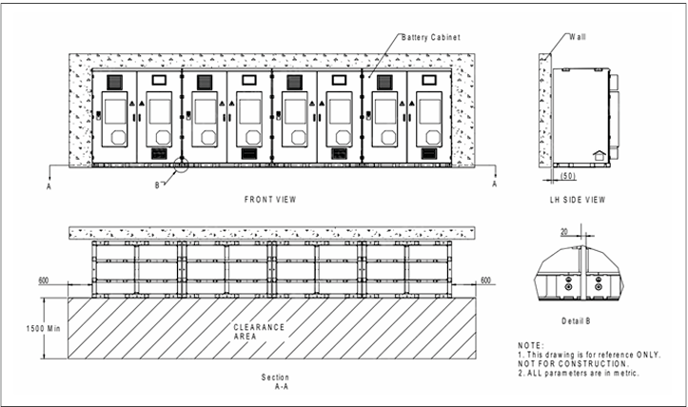
Installation clearance
Step4 - Chemical anchors are recommended.
Before installing the chemical fastener remove all drilling debris and dust. The concrete strength grade is C30, and the chemical fastener reinforcement must be tested for “pull-out”. It is required that the tensile strength of the planted chemical anchor bolt is not less than twice the design value of the bearing capacity.Chemical anchors are recommended to use Hilti HVA chemical anchors. For specific design values, please refer to the table below.
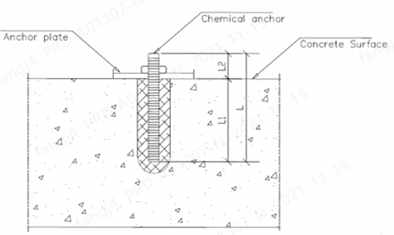
Freestanding installation
4.3.3 PowerBlock installation
Step1 - Transfer the PowerBlock to the designated location by means of forklift transfer or
hoisting. The lifting lug should be repainted after the installation. The diameter of the hole on
the lifting lug is 45mm.
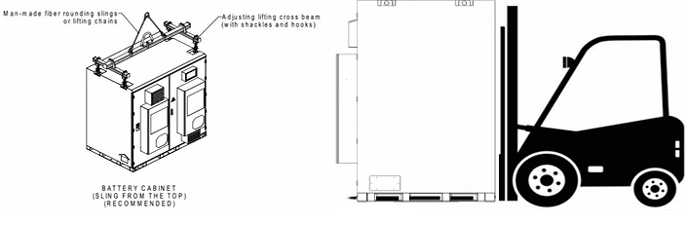
Figure 4-3-3 Forklift or hoisting transfer
Step2 - Affix the compound transport base of the PowerBlock to the foundation. This will serve
as a permanent mount.
Step3 - The bottom of each PowerBlock is fixed with M20 bolts. Torque these Bolts to 300 nm.
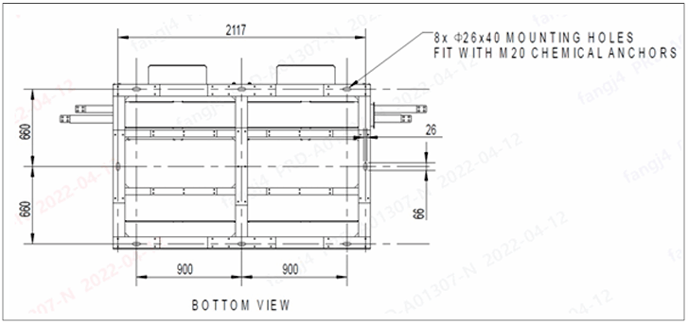
Bottom View of the PowerBlock
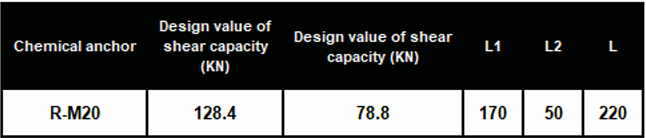
- The construction of chemical anchors should comply with JGJ 145 -2013 Technical
specification for anchorage behind concrete structure. - If there is welding, measures should be taken to avoid overheating of the anchoring
area and lead to the failure of the rebar glue. - Adhesives for load-bearing structures must be tested for bond shear strength. During
the inspection, the standard value of the bonding strength shall be determined according to
the requirements of the confidence level of 0.9 and the guarantee rate of 95%. Step5 Grounding of the PowerBlock. Fix the grounding wire to the grounding point on the PowerBlock with M8 hexagon flange bolts. The torque for M8 fixation: 10N.M, and the size of the ground wire ≥95mm2 (cooper).
Step5 Grounding of the PowerBlock.
Fix the grounding wire to the grounding point on the PowerBlock with M8 hexagon flange
bolts. The torque for M8 fixation: 10N.M, and the size of the ground wire ≥95mm2 (cooper).
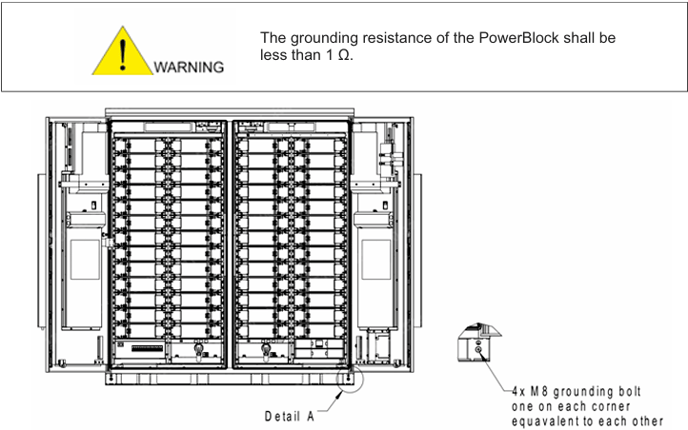
Grounding Detail
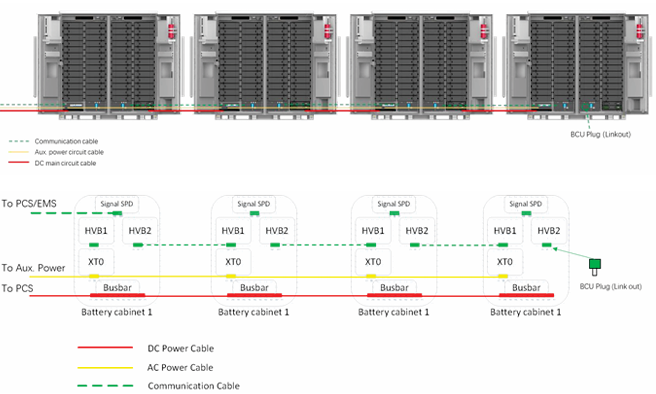
Figure 4-4 PowerBlock wiring
1.1.1 Wiring of communications cable
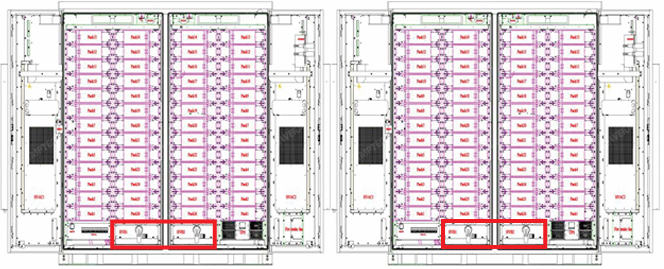
Figure 4-5 HVB layout
6. Cover the HVB terminal cover plate and restore the HVB to its original state.
7. Use a RJ45 Ethernet cable to connect the EMS with the Signal SPD of the first PowerBlock.
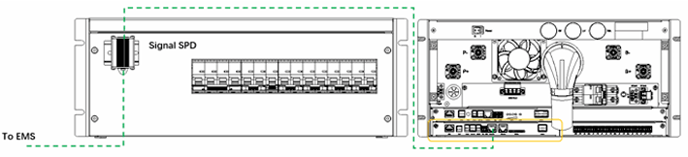
Figure 4-9 Interface with EMS
Installation of auxiliary power supply wire
1. Connect the mains power input lines L1/L2/L3/N to the terminals XT0: L1/L2/L3//N of the
power distribution box correspondingly. The torque is 1.5NM.
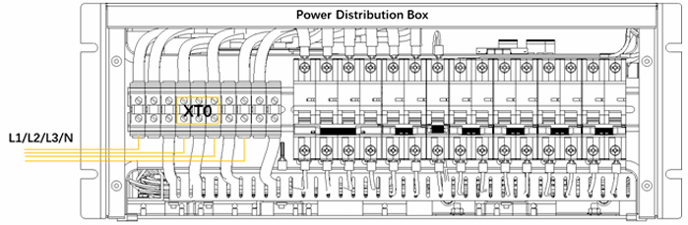
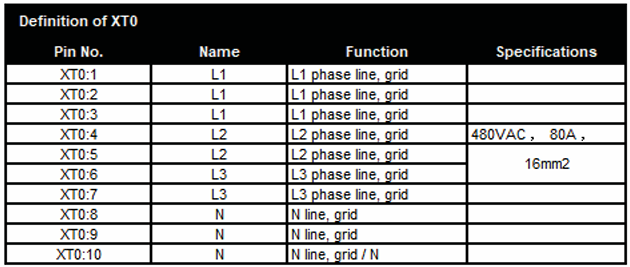
Figure 4-10 Grid Connection of Power Distribution Box
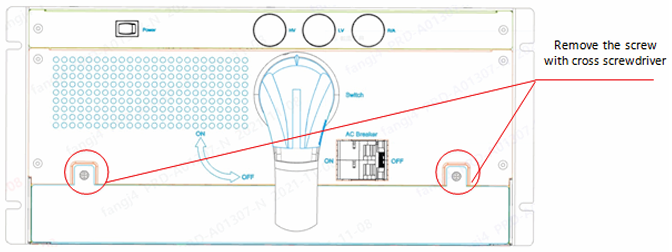
Figure 4-6 HVB interface screws
1. Use a Phillips head screwdriver to remove the two fixing screws under the HVB to expose
the HVB wiring interface.
2. Connect the BCU link out of HVB2 in the first PowerBlock to the BCU link in of HVB1 in the
next PowerBlock.

Figure 4-7 HVB BCU interface
3. Continue step 2 through the last PowerBlock.
4. Insert the BCU plug terminal to the link out port of the last HVB2’ BCU .
5. Insert BAMS into the left HVB of the first PowerBlock adjacent to PCS according to the silk
screen position. Tighten 4 screws on BAMS tray with 1NM torque. Connect Ethernet 1 of BAMS
with the Signal SPD.
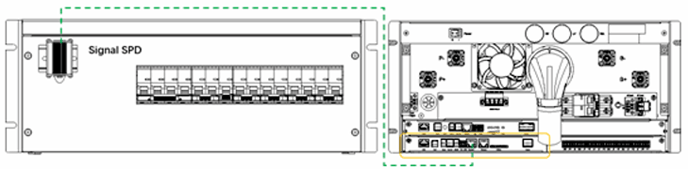
Figure 4-8 HVB BAMS interface
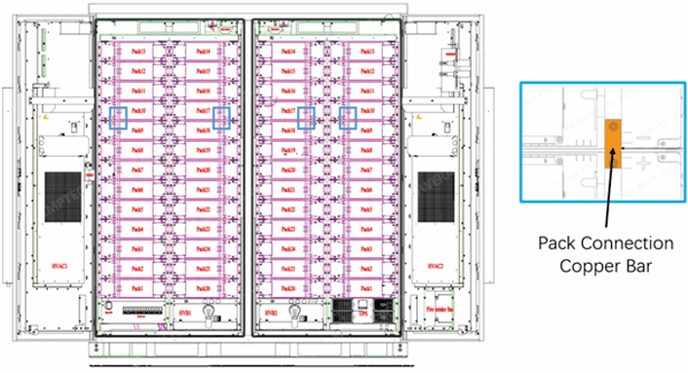

Figure 4- Copper bar connection
3. Remove the copper bar cover plate of the PowerBlock with a Phillips head screwdriver.
4. Connect the bus bar between two PowerBlocks with cross cabinet bar, fix it with M12 bolts,
and torque to 80 Nm.
2. Connect XT0: 3,5,7,9,10 of the first cabinet to next cabinet XT0: 1, 4,6,8. The torque is 1.5 Nm.

Figure 4-11 Aux. power daisy chain connection of internal system
3. Continue Step 2 until the last cabinet.
Installation of power cable
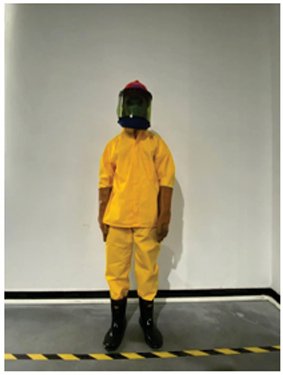
1. Wear PPE
2. Remove the module copper bar cover plate, install the copper bar between module 9
and module 10. Do likewise with module 17 and 18, fasten the copper bar bolts with a
wrench. Torque to 6 Nm. Install the module copper bar cover plate.
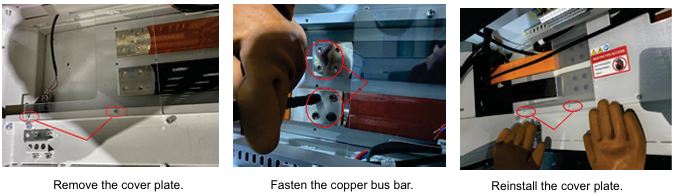
Figure 4-3 Bus bar connection
5. Connect the first PowerBlock bus bar to PCS through wire, fix them with M12 bolts, and torque to 80 Nm, make torque mark. After the connection is completed, apply a circle of sealant around the outlet hole to keep it sealed. Replace the cover plate over copper bar, tighten the screws and restore it to its original state.
Guidance of connection through the side panel
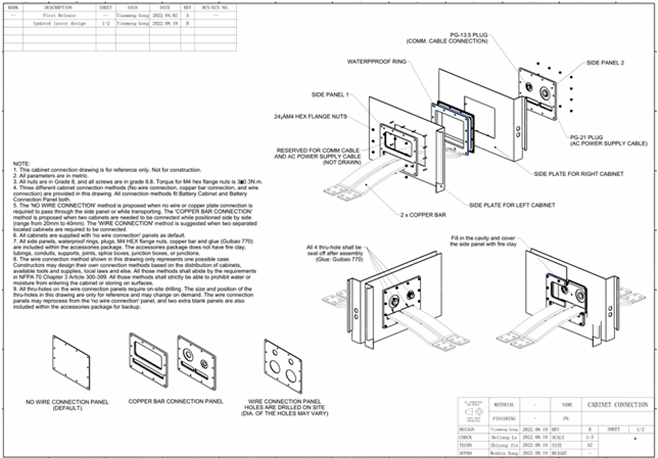
Figure 4-4 Connection between PowerBlocks
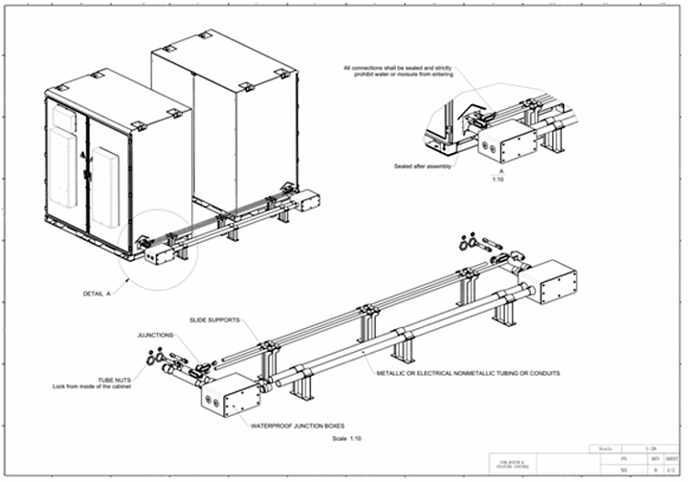
Figure 4-16 Connection between PowerBlocks and PCS
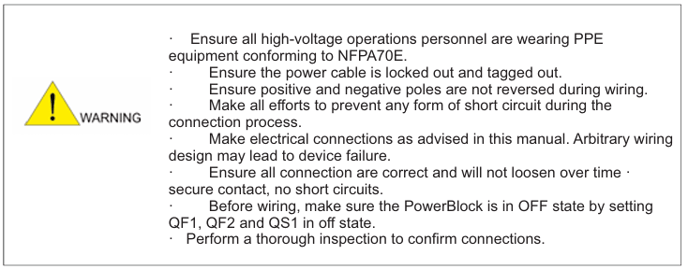
4.3.7 Commissioning checklist
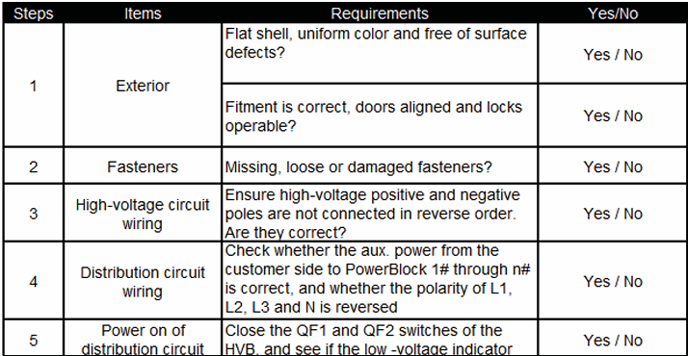
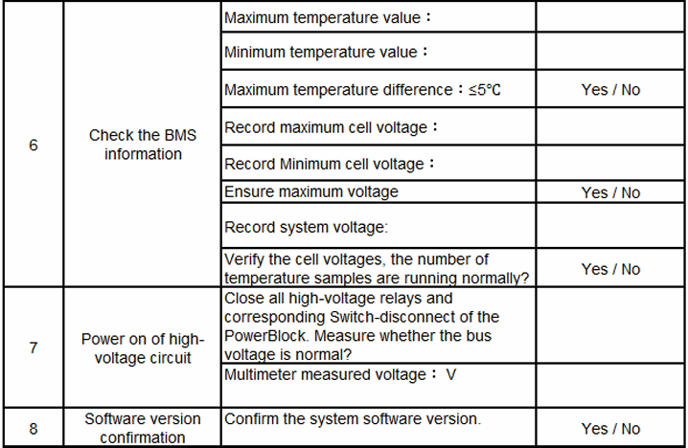
4.3.7 Commission check list
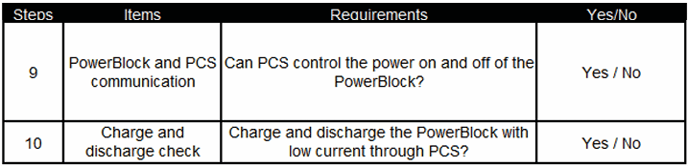
Confirm the modules are powered off and the disconnect of HV Box is
switched off before moving ahead.
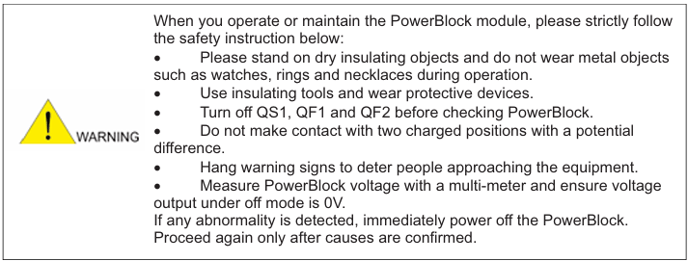
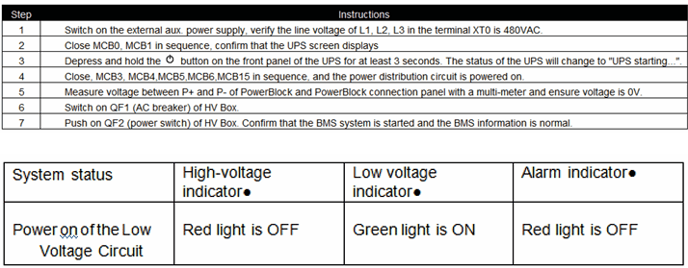
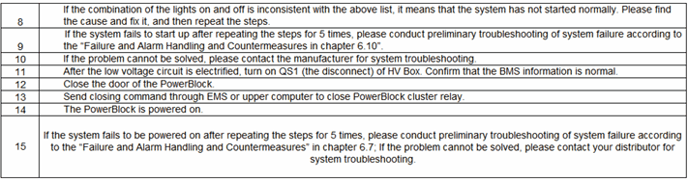
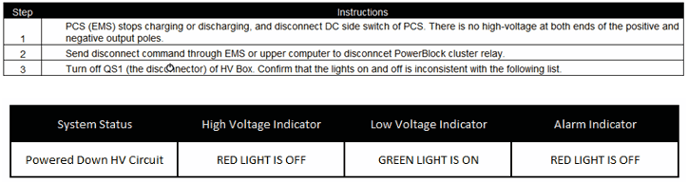
5. Power ON/OFF PowerBlock System
After the PowerBlock is installed, operate and commission it to check if it works properly.
Power Off PowerBlock
5.1 Power On PowerBlock
After installing the system and connecting the cables, you can power
on or off the PowerBlock system.

Figure 5-1 Power distribution box layout
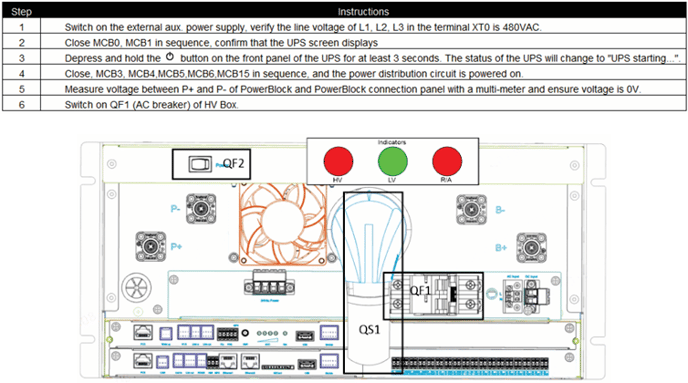
Figure 5-3 HV Box layout
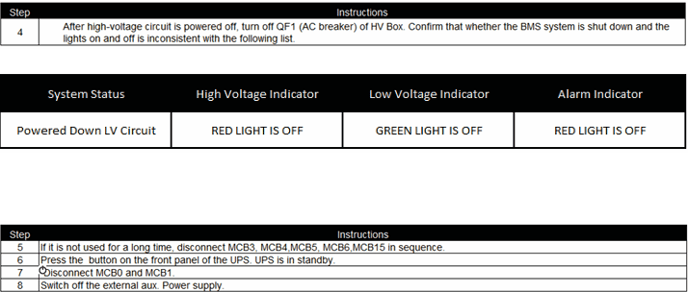

Emergency power off of PowerBlock

6. Maintenance
Preparation
- Use only trained and certified professionals for PowerBlock maintenance.
- Prepare tools like safety gloves, cross head driver and socket wrench.
Terms Explanation
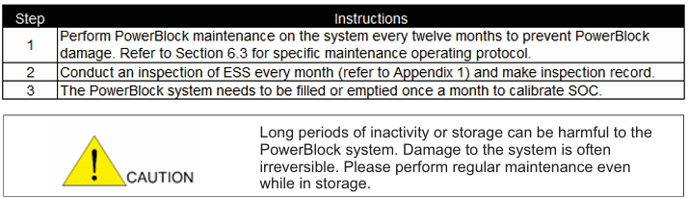
- Normal operating: Refers to the PowerBlock system is charged and discharged every month, and is filled or vented at least once, and operates for at most 2 cycles every day.
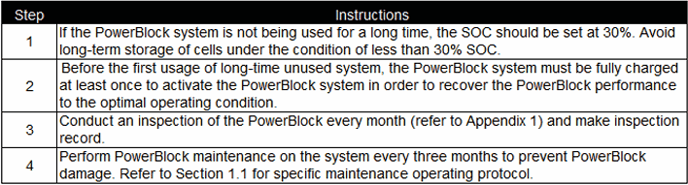
- Long-term storage: The PowerBlock system that has been operated for more than 3 months (the PowerBlock system needs to be charged to 30% SOC before being stored).
6.1 Operating Instructions for Normal Operating System
6.2 Operating Instructions for Long-time Unused System
6.3 Operating Protocol of PowerBlock Maintenance
In order to ensure the long-term safe and reliable operation of your PowerBlock, please read and
follow the instructions below:
Plan 1 This plan is applicable when SOC of the PowerBlock system is less than or equal to 50%.
- Discharge the PowerBlock system to empty (the lowest voltage of cell<2.8V), then stop
discharging, standing for 1 hour. - Full charge the PowerBlock system (the highest voltage of cell>3.55V), then stop charging,
standing for 1 hour. - Discharge the PowerBlock system to 30% SOC and stop.
Plan 2 This plan is applicable when SOC of the PowerBlock system is more than 50%.
- Full charge the PowerBlock system (the highest voltage of cell>3.55V), then stop charging,
standing for 1 hour. - Discharge the PowerBlock system to empty (the lowest voltage of cell<2.8V), then stop
discharging, standing for 1 hour. - Charge the PowerBlock system to 30% SOC and stop.
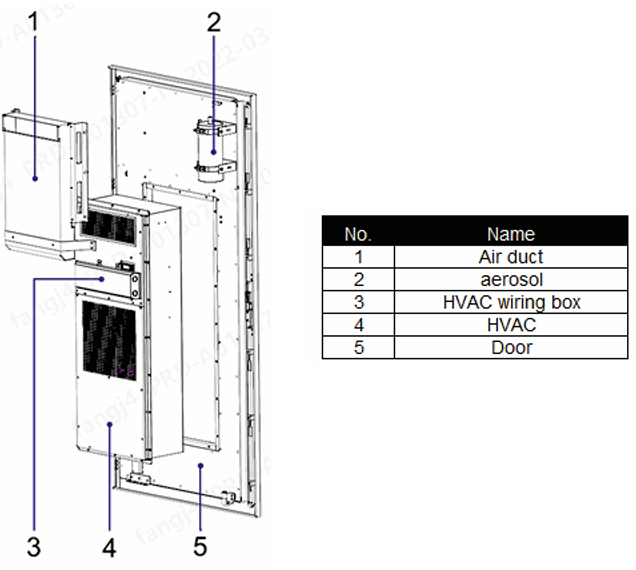
6.4 HVAC maintenance
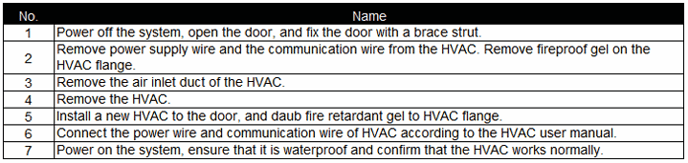
Please refer to the HVAC manual for HVAC operating instructions. For disassembly and
assembly of HVAC, please read and follow the instructions below:
6.5 Operation instructions for UPS
Please refer to UPS manual for UPS operation instructions.
6.6 Operating instructions for Fire extinguishing system
Please refer to fire-extinguishing system manual for FFS operating instructions.
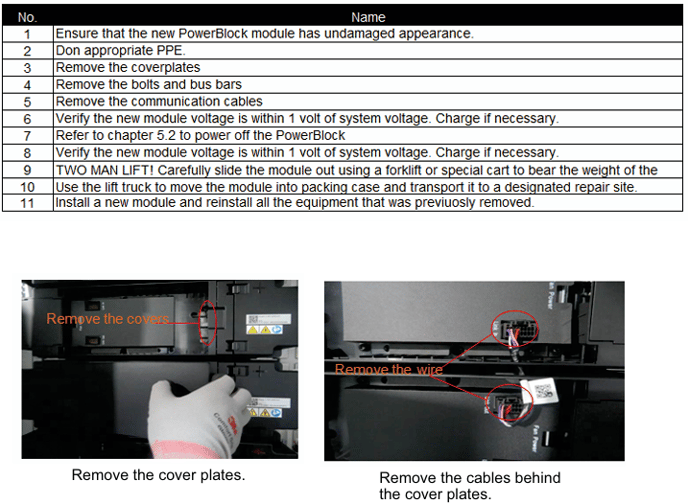
6.7 Replacing a PowerBlock Module
6.8 Replace HVB
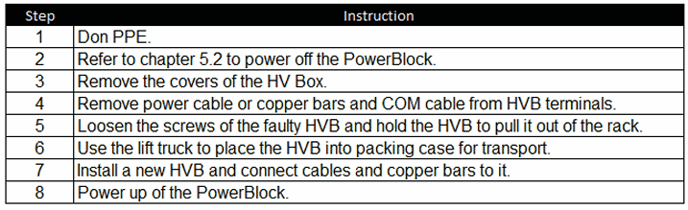
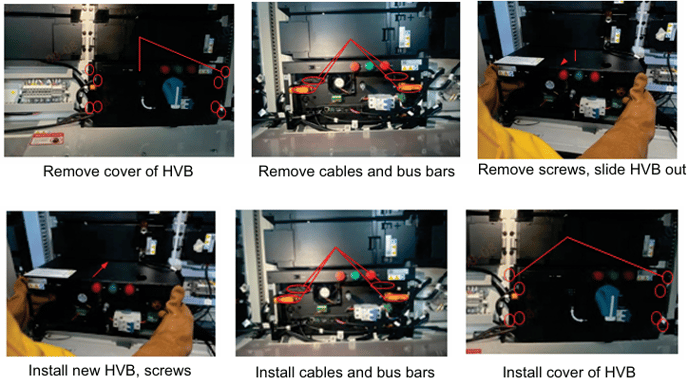
Figure 6-5 HV Box replacement
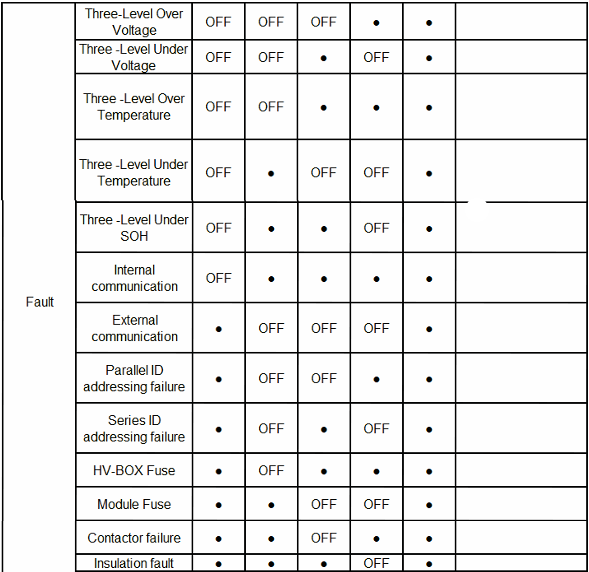

This chapter contains simple failure diagnosis procedures. If the diagnosis or the information
obtained is insufficient to solve the problem, please contact the local office or distributor of
the PTL.
6.9 Upgrade Firmware
The firmware of the PowerBlock system can be upgraded through
USB, EMS, or Wi-Fi. For details about how to upgrade the
firmware, contact e-On technical support.
6.10 Troubleshooting

6.11 Emergency Treatment Protocol - Fire
The PowerBlock system has over-temperature protection that should reduce or eliminate cases of fire by shutting the system down. However, cases of damage or improper wiring may lead to a fire. It is normally best to rely on the onboard fire suppression system, when practical.
Fire emergencies may include but are not limited to the following conditions:
- Abnormal smell in or around the PowerBlock cabinet
- Escaping smoke from the PowerBlock cabinet
- Visible flames escaping the PowerBlock cabinet
- Excessive heat on the PowerBlock cabinet exterior
Fire emergencies may include but are not limited to the following conditions:
The following measures should be taken:
- Depress the emergency stop switch on the front of the case.
- Evacuate personnel to a safe area.
- Attempt to remotely disconnect the relay in the PowerBlock.
- Attempt to remotely check the cell temperatures, voltages, and temperature of the air conditioner in the cabinet. If the measurements are normal and there is no fire, contact the dealer for further consultation. If the temperatures are abnormal, evacuate and notify the fire department. If the system can be safely and remotely disconnected, do so.
- If the batteries are on fire, disconnect the AC and DC power inputs use a high pressure water nozzle to cool other PowerBlocks at a distance (>20m/ >60ft.). If the door of the PowerBlock is opened, water can be sprayed from this distance to extinguish the fire.
- If you accidentally inhale smoke, seek medical attention as soon as possible.
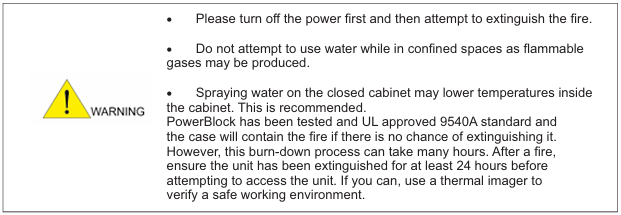
6.11.1 Emergency Protocol
Emergency Flooding
- PowerBlock is equipped with a flooding adapter (Top, rear of the cabinet) for use in areas
where mandated by law or other regulation. Regardless of whether the system is powered on, evacuate people to safe area before turning on the water. Flooding is the “worst-case” scenario and may lead to permanent damage, so it is best to avoid this method when possible. - After a flooding event, please contact e-On Batteries' technical support staff (+1(800) 636
3616) to schedule a safety inspection, overhaul or unit replacement.
Other Emergencies
Other emergencies can occur:
- Cabinet deformation
- Leaking LiFePO4 modules
- Damages while in transit
The following measures should be taken:
- Depress the emergency stop switch on the front of the cabinet.
- Evacuate unnecessary personnel to a safe area.
- In the event the PowerBlock is in transit, it should be transferred to an open area, safely away from people, buildings and vehicles. If at sea, efforts should be made to extinguish the fire, if this is not possible the cargo should be jettisoned.
- After a damage event, always inspect the unit with a thermal imager to ensure safe
temperatures.
7. Emergency Protocol
Before using the PowerBlock, you should read the specifications, safety information and operation instructions carefully to learn its application protocol and scenarios. e-On does not
assume any accountability for the accidents or liabilities in the event the PowerBlock is used for
applications or under conditions other than those described in this Document.
8. Post-sales Service
Please refer to our limited warranty policy.
The following circumstances are outside the scope of our warranty:
- System damage or failure caused from not following the User Manual.
- Damage or failure due to not following electrical safety specifications for wiring and power
supplies or unsuitable operating environment. - System damage due to unauthorized modifications
- System damage due to “Acts of God”, including but not limited to:
- Hurricanes and associated damage
- Tornadoes and associated damage
- Earthquakes and associated damage
- Tidal waves and associated damage
- Fallen trees and associated damage
- Acid rain and associated damage
- Temperatures outside the operating parameters
- Damage from transit will justify a claim against the carrier
- If damage occurs, refer to the manual and contact technical support. Failure to isolate a failing component can lead to further damage.
- Attempting to operate the system with evidence or suspected evidence of system damage will void all warranty claims.
9. Recycling
PowerBlock contains LiFePO4 Lithium ion batteries that are recyclable. Find a local recycler, according to the federal and local laws or regulations. Do NOT throw your PowerBlock into any bin that may end up in a landfill. For information on used batteries, contact the place of purchase or your PowerBlock distributor.
10. Regulatory Compliance
PowerBlock has cleared UN3480 and SN/T 0370.3-2012. The PowerBlock is classified as class 9 dangerous goods, and is subject to land and water transportation. During transportation, please stand the PowerBlock on the floor and affix it to the trailer with bolts whenever possible. This will minimize damage from vibration. Maintain temperature between -20℃ to 45℃ during the
transportation. Prohibit mixing up with explosive, inflammable or toxic objects. Use van-type vehicle including container and metallic van-type vehicle. Platform vehicle and convertible are prohibited. Maintain original packaging and keep labels complete and recognizable. Prevent rain penetration and flooding from the PowerBlock.
10.2 FCC Compliance
This equipment has been tested and found to comply with the limits for a Class B digital device,
pursuant to part 15 of the FCC rules. These limits are designed to provide reasonable protection
against harmful interference in a residential installation.
This equipment generates, uses and can radiate radio frequency energy and, if not installed
and used in accordance with the instructions, may cause harmful interference to radio
communications. However, there is no guarantee that interference will not occur in particular
installation. If this equipment does cause harmful interference to radio or television reception,
which can be determined by turning the equipment off and on, the user is encouraged to try to
correct the interference by one or more of the following measures:
- Reorient or relocate the receiving antenna.
- Increase the separation between the equipment and receiver.
- Connect the equipment into an outlet on a circuit different from that to which the receiver is
connected. - Consult the dealer or an experienced radio/TV technician for help.
11. Appendix 1

11.1 Appendix 2
